Appearance
页面导航标签
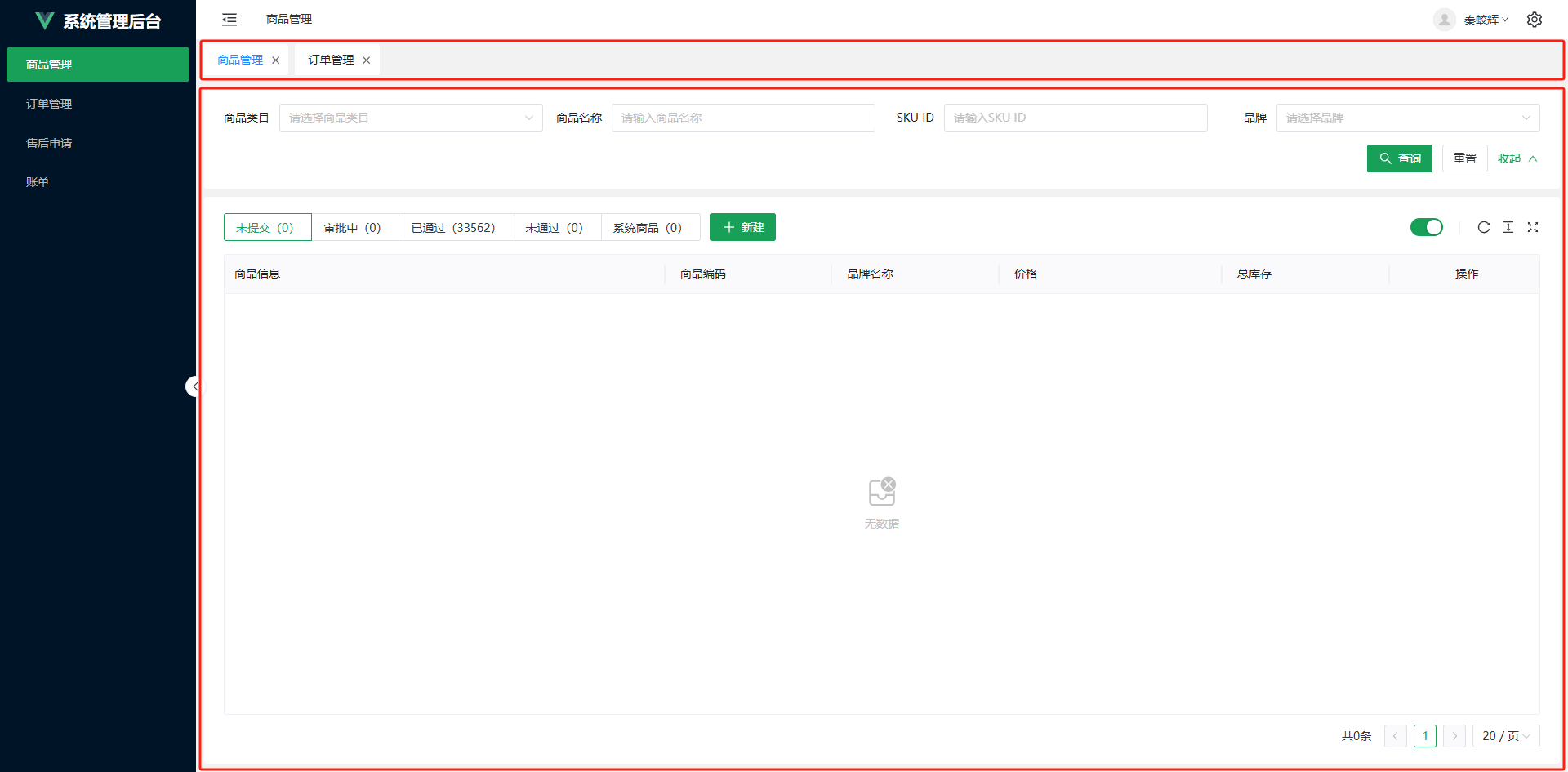
页面导航标签实现了类似浏览器标签页的功能,主要位于页面顶部菜单栏下方。它不仅支持标签拖动,还提供了基于标签的路由缓存功能,确保用户可以在多个页面之间高效切换,并且保持页面状态。
主要功能
标签拖动
- 用户可以通过拖动标签来调整标签顺序,方便管理和组织打开的页面。
基于标签的路由缓存
- 使用 Vue 的
keep-alive组件来缓存页面组件实例。默认情况下,keep-alive是基于组件名称进行缓存的,这意味着一次只能编辑一个相同类型的页面(如商品编辑页面)。通过自定义处理,可以同时打开并缓存多个相同类型的页面(例如多个商品编辑页面),每个页面都有独立的状态。
- 使用 Vue 的
标签关闭
- 用户可以点击标签上的关闭按钮(×)来关闭单个标签,系统会自动跳转到最近打开的标签页面。如果所有标签都被关闭,则跳转到默认首页。
标签切换
- 点击不同的标签可以快速切换当前显示的页面。系统会根据标签的唯一标识
_tagKey来区分相同路径下的不同页面,确保正确加载和显示内容。
- 点击不同的标签可以快速切换当前显示的页面。系统会根据标签的唯一标识
滚动按钮
- 当标签数量过多超出显示范围时,左右两侧会出现滚动按钮,用户可以通过点击这些按钮来滚动查看隐藏的标签。
LayoutMain 组件
LayoutMain 组件负责控制导航标签和页面显示以及页面缓存。其核心功能包括:
- 标签管理:维护一个标签列表
pageTags,记录每个标签的关键信息(如标签键、标签名、是否缓存等)。 - 路由监听:监听路由变化,动态更新标签列表,确保每次打开新页面或切换页面时都能正确添加或更新标签。
- 缓存机制:使用
keep-alive和fmtCompInst方法来缓存页面组件实例,确保页面状态不会丢失。 - 标签操作:提供关闭当前标签、切换标签等操作方法,并通过事件触发相应的逻辑处理。
代码结构
vue
<template>
  <div class="layout-main">
    <div class="tabs-box">
      <!-- <n-tabs :value="actionPageTagkey" type="card" size="small" closable tab-style="background-color: #fff;" @close="onClosePageTag" @update:value="onChangePageTag">
        <n-tab v-for="item in pageTags" :key="item.key" :name="item.key">{{ item.label }}</n-tab>
      </n-tabs> -->
      <NavTags :value="actionPageTagkey" v-model:tags="pageTags" @close="onClosePageTag" @update:value="onChangePageTag" />
    </div>
    <router-view v-slot="{ Component }">
      <transition name="main" mode="out-in" appear>
        <keep-alive :include="keepAliveCompntNames">
          <component :is="fmtCompInst(Component)" />
        </keep-alive>
      </transition>
    </router-view>
  </div>
</template>

<script setup lang="ts">
import { ref, computed, watch, h, provide } from 'vue';
import type { VNode } from 'vue';
import { useRouter, useRoute } from 'vue-router';
import type { IPageTag } from '@/types/pageTag.d';
import type { ITagOperate } from '@/types/tagOperate.d';
import NavTags from '../NavTags';

interface ICurrTagParams {
  tagKey: string;
  tagLabel: string;
  keepAlive: boolean;
}
const props = withDefaults(
  defineProps<{
    currTagParams: ICurrTagParams | null; //当前打开的页面的tag参数
  }>(),
  {
    currTagParams: null
  }
);

defineExpose({ closeCurrTag });

const tagOperate: ITagOperate = {
  closeCurrTag
};
provide('tagOperate', tagOperate);

const router = useRouter();
const route = useRoute();
const pageTags = ref<IPageTag[]>([]);
//提供给fmtCompInst中使用,fmtCompInst中不能使用响应式数据,否则actionPageTagkey变动时,会重新渲染<component /> 组件
//所以监听了actionPageTagkey的变化给actionTagKey赋值
let actionTagKey: string | undefined = undefined;
const actionPageTagkey = ref<string | undefined>();
watch(
  () => actionPageTagkey.value,
  (val) => {
    actionTagKey = val;
  }
);
//存储tag列表中的组件实例
const comCache = new Map<string, VNode>();

const keepAliveCompntNames = computed(() => {
  return pageTags.value.filter((item) => item.keepAlive).map((item) => item.key);
});

watch(
  () => props.currTagParams,
  () => {
    actionPageTagkey.value = props.currTagParams?.tagKey;
    // eslint-disable-next-line @typescript-eslint/no-unused-vars
    const { back, current, forward, position, replaced, scroll, ...state } = history.state || {};

    const currPageTag = pageTags.value.find((item) => item.key === actionPageTagkey.value);
    if (actionPageTagkey.value && !currPageTag) {
      //判断是新打开的tag,就添加到pageTags中

      pageTags.value.push({
        key: actionPageTagkey.value,
        label: props.currTagParams!.tagLabel,
        keepAlive: props.currTagParams!.keepAlive,
        routeName: route.name,
        routePath: route.path,
        routeQuery: route.query,
        routeParams: route.params,
        historyState: state
      });
    } else if (actionPageTagkey.value && currPageTag) {
      //判断是已经打开的tag,就更新相关参数
      Object.assign(currPageTag, {
        routeQuery: route.query,
        routeParams: route.params,
        historyState: state
      });
    }
  },
  { immediate: true }
);

function fmtCompInst(component: VNode | undefined): VNode | undefined {
  if (!component) return component;
  if (actionTagKey && comCache.has(actionTagKey)) {
    return comCache.get(actionTagKey)!;
  } else {
    const com = h({ name: actionTagKey, render: () => h(component) });
    comCache.set(actionTagKey!, com);
    return com;
  }
}
//点击关闭标签
function onClosePageTag(key: string): void {
  const tagIndex = pageTags.value.findIndex((item) => item.key === key);
  pageTags.value.splice(tagIndex, 1);

  if (key === actionPageTagkey.value) {
    const currTag = pageTags.value[Math.max(0, pageTags.value.length - 1)];
    if (currTag) {
      router.push({ path: currTag.routePath, query: { ...currTag.routeQuery, _tagKey: key }, state: currTag.historyState });
    } else {
      router.push({ name: 'layout' });
    }
  }
  comCache.delete(key);
}
//切换标签
function onChangePageTag(key: string): void {
  const pageTag = pageTags.value.find((item) => item.key === key);
  if (!pageTag) return;
  //跳转路由时须设置_tagKey参数用于区分相同路径下,不同页面,
  //例如:商品编辑页面路径都是/prod/edit,想要同时显示多个不同的商品编辑页面,就需要用一个唯一标识,否则路由也不会发生跳转,这里使用的唯一标识为_tagKey
  //扩展说明:也可以使用路由名称跳转的方式 {name: 'prodEdit', params: {_tagKey: 'xxx'}},但路由须提前设置为{ path: '/prod/edit/:_tagKey' },略显麻烦。
  router.push({ path: pageTag.routePath, query: { ...pageTag.routeQuery, _tagKey: key }, state: pageTag.historyState });
  actionPageTagkey.value = pageTag.key;
}

//关闭当前标签
function closeCurrTag() {
  if (actionPageTagkey.value) {
    const tagIndex = pageTags.value.findIndex((item) => item.key === actionPageTagkey.value);
    pageTags.value.splice(tagIndex, 1);
    comCache.delete(actionPageTagkey.value);
  }
}
</script>

<style lang="scss" scoped>
.layout-main {
  flex: 1;
  min-height: 0;
  display: flex;
  flex-direction: column;
  .tabs-box {
    margin: 5px 10px;
  }
  .main-enter-active,
  .main-leave-active {
    transition:
      transform 0.35s,
      opacity 0.28s ease-in-out;
  }

  .main-enter-from {
    opacity: 0;
    transform: scale(0.97);
  }

  .main-leave-to {
    opacity: 0;
    transform: scale(1.03);
  }
}
</style>
NavTags 组件
NavTags 组件负责渲染和管理具体的标签元素。其核心功能包括:
- 标签渲染:根据传入的
tags属性渲染标签列表,支持拖拽排序。 - 滚动控制:当标签溢出时,显示左右滚动按钮,允许用户滚动查看隐藏的标签。
- 事件处理:处理标签点击、关闭、拖拽等事件,并通过事件传递给父组件进行进一步处理。
代码结构
vue
<template>
  <div class="nav-tags-container" :style="navTagsStyleVar">
    <button v-if="showScrollButtons" type="button" class="scroll-btn left-btn" @click="scrollLeft">
      <svg xmlns="http://www.w3.org/2000/svg" viewBox="0 0 24 24">
        <path d="M15.41 16.09l-4.58-4.59 4.58-4.59L14 5.5l-6 6 6 6z" />
      </svg>
    </button>
    <div class="nav-tags-box" ref="navTagsBox">
      <transition-group name="tag">
        <div
          v-for="(item, index) in tags"
          :key="item.key"
          class="nav-tag"
          :class="{ 'nav-tag__action': item.key === value }"
          draggable="true"
          @dragstart="onDragStart($event, index)"
          @dragend="onDragEnd"
          @dragover.prevent
          @dragenter="onDragEnter(index)"
          @click="onClickTag(item)"
        >
          <span class="tag-text">{{ item.label }}</span>
          <i class="close-icon" @click="onCloseTag(item)">
            <svg xmlns="http://www.w3.org/2000/svg" xmlns:xlink="http://www.w3.org/1999/xlink" viewBox="0 0 24 24">
              <path d="M19 6.41L17.59 5L12 10.59L6.41 5L5 6.41L10.59 12L5 17.59L6.41 19L12 13.41L17.59 19L19 17.59L13.41 12L19 6.41z" fill="currentColor"></path>
            </svg>
          </i>
        </div>
      </transition-group>
    </div>
    <button v-if="showScrollButtons" type="button" class="scroll-btn" @click="scrollRight">
      <svg xmlns="http://www.w3.org/2000/svg" viewBox="0 0 24 24">
        <path d="M8.59 16.34l4.58-4.59-4.58-4.59L10 5.75l6 6-6 6z" />
      </svg>
    </button>
  </div>
</template>

<script lang="ts" setup>
import { ref, reactive, onMounted, onUnmounted, watch, nextTick } from 'vue';
import type { IPageTag } from '@/types/pageTag.d';

const props = withDefaults(
  defineProps<{
    value: string | undefined;
    tags: IPageTag[];
    actionColor?: string;
  }>(),
  {
    value: undefined,
    tags: () => [],
    actionColor: '#2d8cf0'
  }
);

const emits = defineEmits<{
  (e: 'close', key: string): void;
  (e: 'update:tags', value: IPageTag[]): void;
  (e: 'update:value', value: string): void;
}>();

const navTagsStyleVar = reactive({
  '--nav-tags-action-color': props.actionColor
});

const navTagsBox = ref<HTMLDivElement | null>(null);
const showScrollButtons = ref<boolean>(false);

let dragSourceIndex: number | null = null;

let resizeObserver: ResizeObserver | null = null;

watch(
  () => props.tags,
  () => {
    nextTick(() => {
      checkScrollButtonsVisibility();
    });
  },
  { deep: true }
);
onMounted(() => {
  if (navTagsBox.value) {
    resizeObserver = new ResizeObserver(checkScrollButtonsVisibility);
    resizeObserver.observe(navTagsBox.value);
    checkScrollButtonsVisibility();
  }
});

onUnmounted(() => {
  if (resizeObserver && navTagsBox.value) {
    resizeObserver.unobserve(navTagsBox.value);
  }
});

function checkScrollButtonsVisibility() {
  if (navTagsBox.value) {
    showScrollButtons.value = navTagsBox.value.scrollWidth > navTagsBox.value.clientWidth;
  }
}

function onDragStart(event: DragEvent, index: number) {
  dragSourceIndex = index;
  (event.target as HTMLElement).classList.add('nav-tag__draging');
}

function onDragEnd(event: DragEvent) {
  (event.target as HTMLElement).classList.remove('nav-tag__draging');
}

function handleDragEnter(index: number) {
  if (dragSourceIndex === null || dragSourceIndex === index) return;
  const tempTags: IPageTag[] = JSON.parse(JSON.stringify(props.tags));
  const [movedTag] = tempTags.splice(dragSourceIndex!, 1);
  tempTags.splice(index, 0, movedTag);
  emits('update:tags', tempTags);
  dragSourceIndex = index;
}

const onDragEnter = debounce(handleDragEnter, 200);

// 防抖函数
function debounce<T extends (...args: any[]) => void>(fn: T, delay: number) {
  let timer: number | null = null;
  return function (...arg: Parameters<T>) {
    if (typeof timer === 'number') clearTimeout(timer);
    timer = setTimeout(() => {
      fn(...arg);
    }, delay);
  };
}

function onClickTag(item: IPageTag) {
  emits('update:value', item.key);
}

function onCloseTag(item: IPageTag) {
  emits('close', item.key);
}

function scrollLeft() {
  if (navTagsBox.value) {
    navTagsBox.value.scrollBy({ left: -100, behavior: 'smooth' });
  }
}

function scrollRight() {
  if (navTagsBox.value) {
    navTagsBox.value.scrollBy({ left: 100, behavior: 'smooth' });
  }
}
</script>

<style lang="scss" scoped>
.nav-tags-container {
  overflow: hidden;
  display: flex;
  flex-direction: row;
  .scroll-btn {
    border: none;
    cursor: pointer;
    transition: background 0.3s ease;
    border-radius: 3px;

    &:hover {
      background-color: #e7e7e7;
    }

    svg {
      width: 24px;
      height: 24px;
      fill: #666;
    }
  }
  .nav-tags-box {
    display: flex;
    flex-direction: row;
    gap: 8px;
    overflow-x: auto;
    overflow-y: hidden;
    flex: 1;
    min-width: 0;
    &::-webkit-scrollbar {
      width: 0;
      height: 0;
    }
    .nav-tag {
      flex-grow: 0;
      flex-shrink: 0;
      padding: 8px 8px 8px 16px;
      background-color: #ffffff;
      display: flex;
      flex-direction: row;
      gap: 8px;
      align-items: center;
      font-size: 14px;
      color: #1f2225;
      cursor: pointer;
      border-radius: 3px;
      &__action {
        color: var(--nav-tags-action-color);
      }
      &__draging {
        opacity: 0.5;
      }
      .close-icon {
        width: 1.1em;
        height: 1.1em;
        line-height: 1.1em;
        fill: #666;
        color: #666;
        border-radius: 2px;
        &:hover {
          background-color: #e7e7e7;
        }
      }
    }
    .tag-move,
    .tag-enter-active,
    .tag-leave-active {
      transition: all 0.3s ease;
    }

    .tag-enter-from,
    .tag-leave-to {
      opacity: 0;
      transform: translateY(30px);
    }

    .tag-leave-active {
      position: absolute;
    }
  }
}
</style>